
The rep walks in already knowing the account.
ProConnect Rep: AI-assisted ordering for field sales, added to ProConnect Commerce. Your reps order for every customer they look after, from one login, on account. Before each visit the AI briefs them on the account; in the shop they ask it questions in plain English.
The problem
Reps still walk in cold
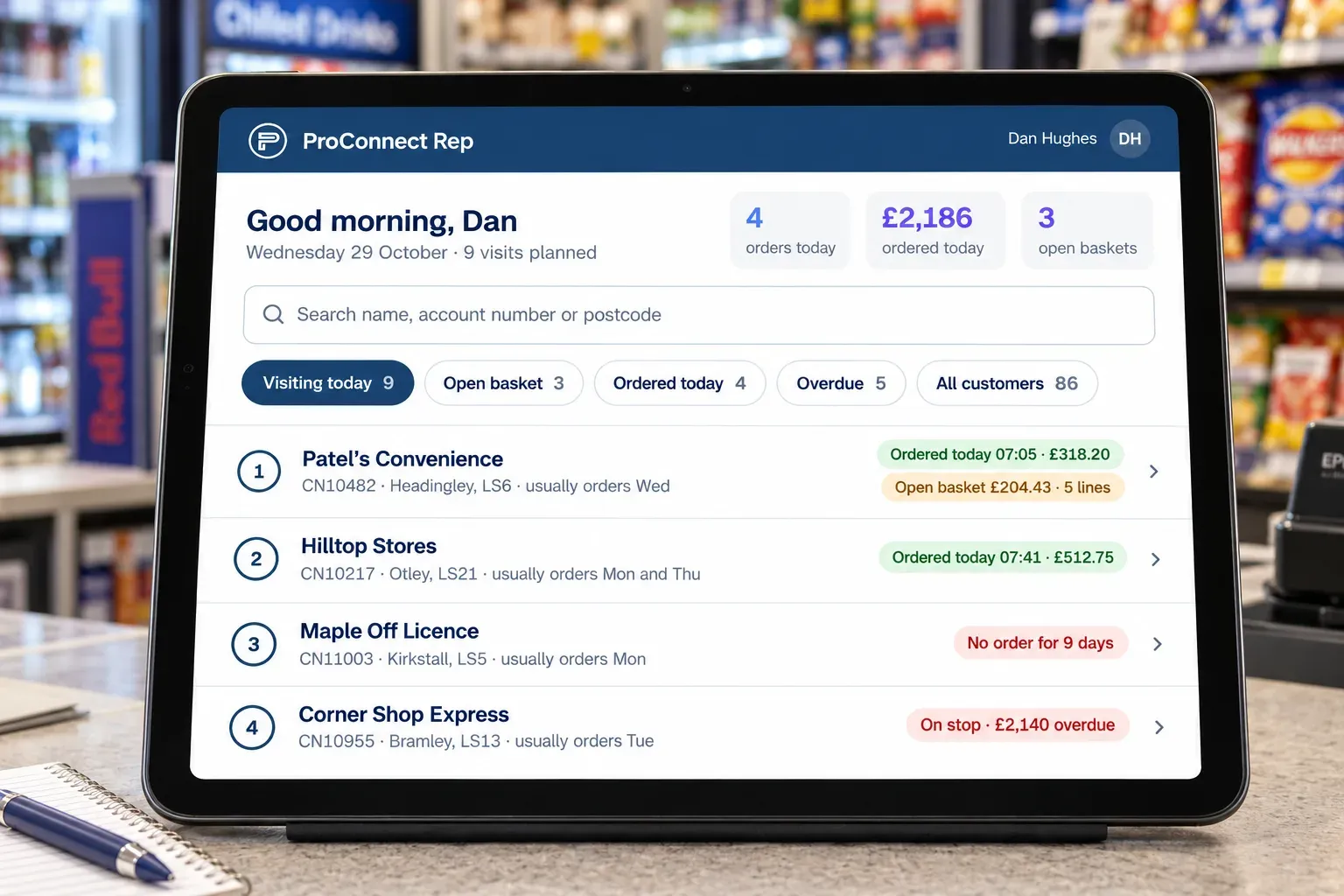
A rep on a round sees a dozen customers a day. The account history sits in the office system, the basket sits on the customer’s app, and the overdue balance comes up only when the order is already written. So the visit runs on memory and a notebook, and the order gets keyed in twice.
- Reps don’t know what the customer has stopped buying until the customer tells them
- Accounts on stop are discovered at the till, not before the visit
- Price concessions are agreed on the spot and reconciled later, if at all
- Orders taken in the shop are rekeyed back at the office
ProConnect Rep
What ProConnect Rep does
Briefs the rep before every visit
Spend against last period, lines the customer has stopped buying, what’s in their basket right now, what’s overdue and whether the account is on hold. Generated by the AI from order history, account status and current promotions, and read in thirty seconds in the van.
One login, every customer
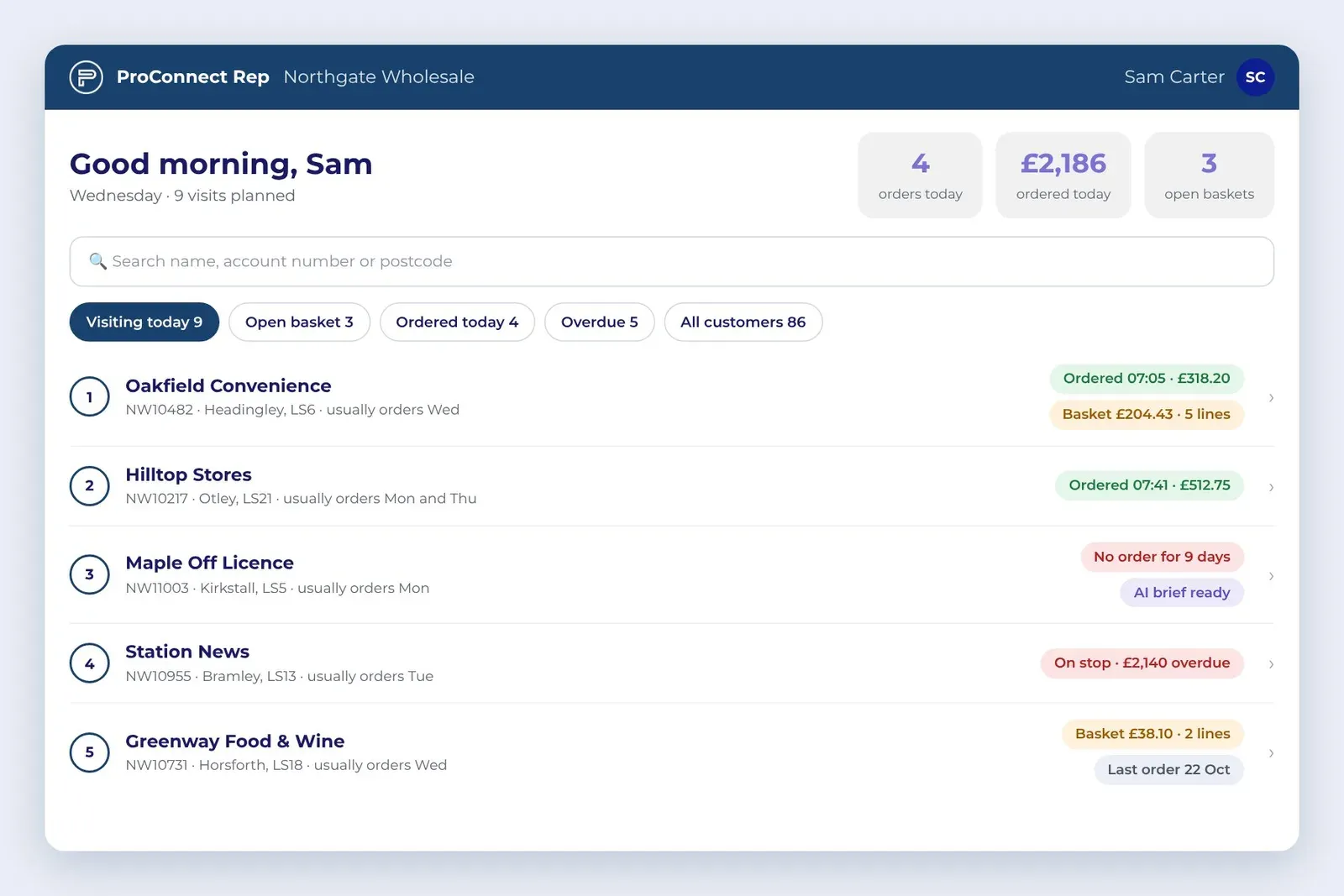
Each rep has their own login, never the customer’s. Today’s customers appear in visit order; switching account takes two taps. The office sets up reps and assigns their customers.
The customer’s live basket
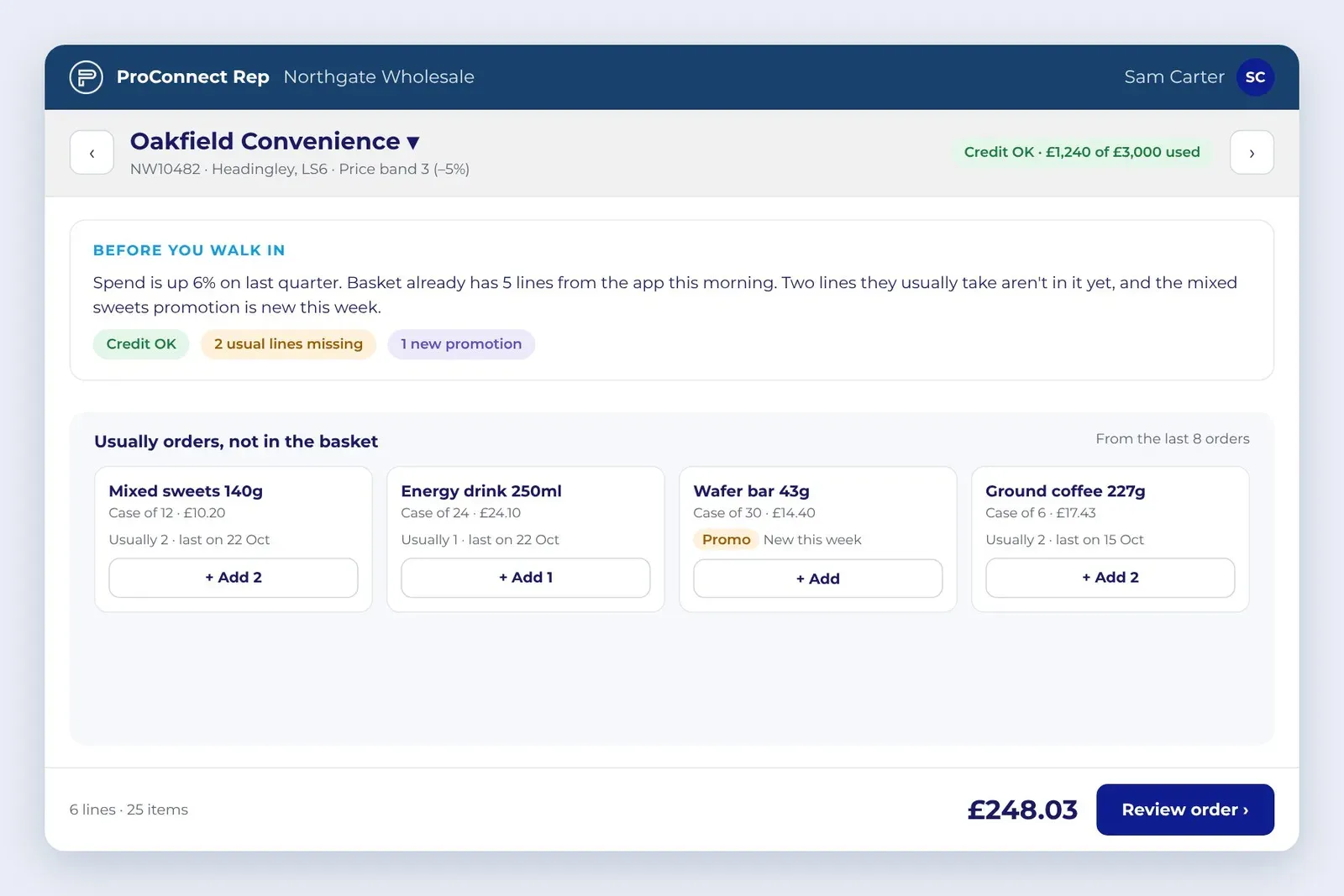
The rep sees and edits the same basket the retailer is filling on the app, including items added but not yet checked out. Changes show on the retailer’s app straight away.
Upselling built in
Products the customer usually buys but hasn’t added, plus current promotions, each one tap to add.
Ask the account
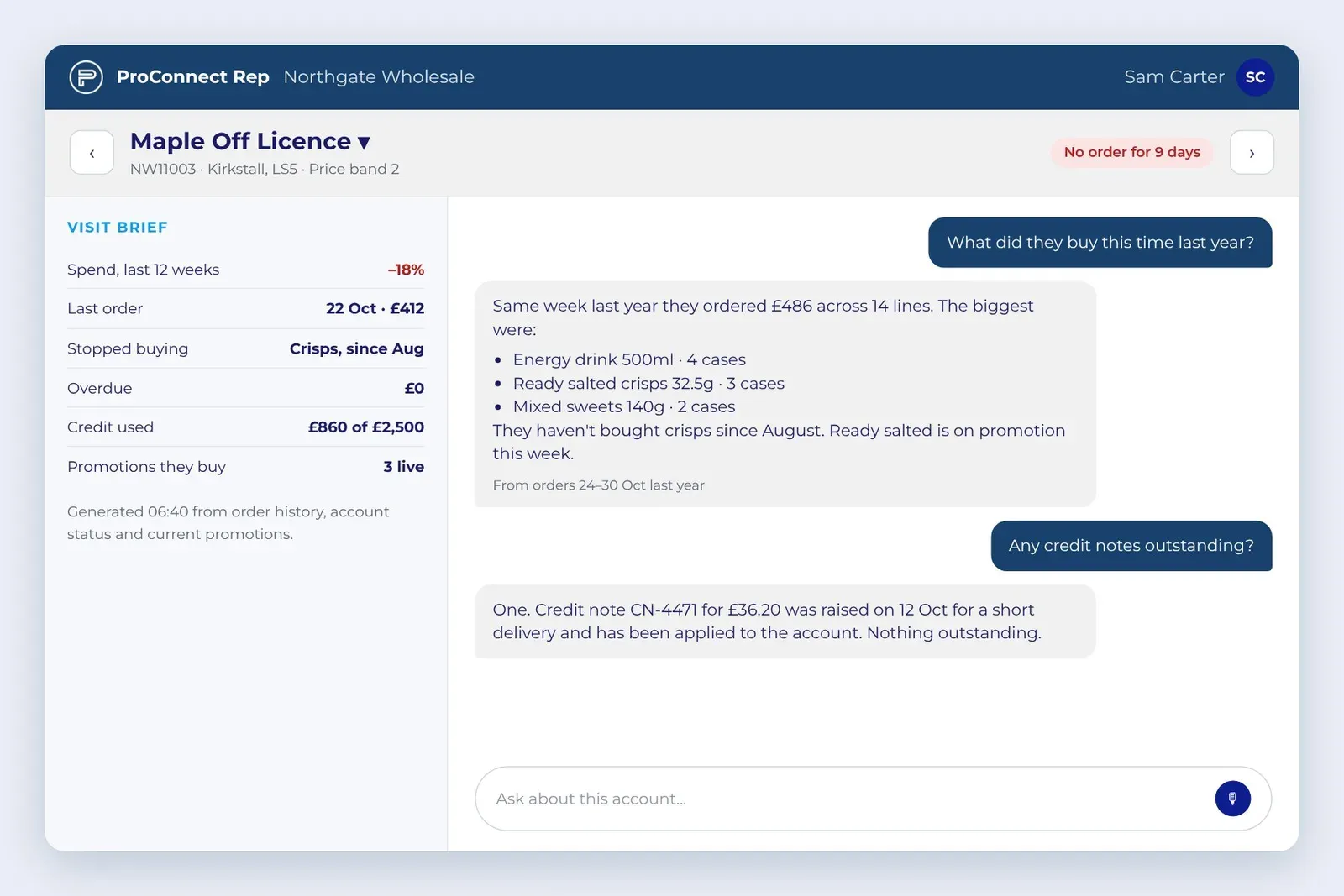
“What did they buy this time last year?” “Any open disputes?” The rep asks in plain English, by text or voice, and gets an answer from the account data. Anything that needs a person is handed to your team.
Price changes, within limits
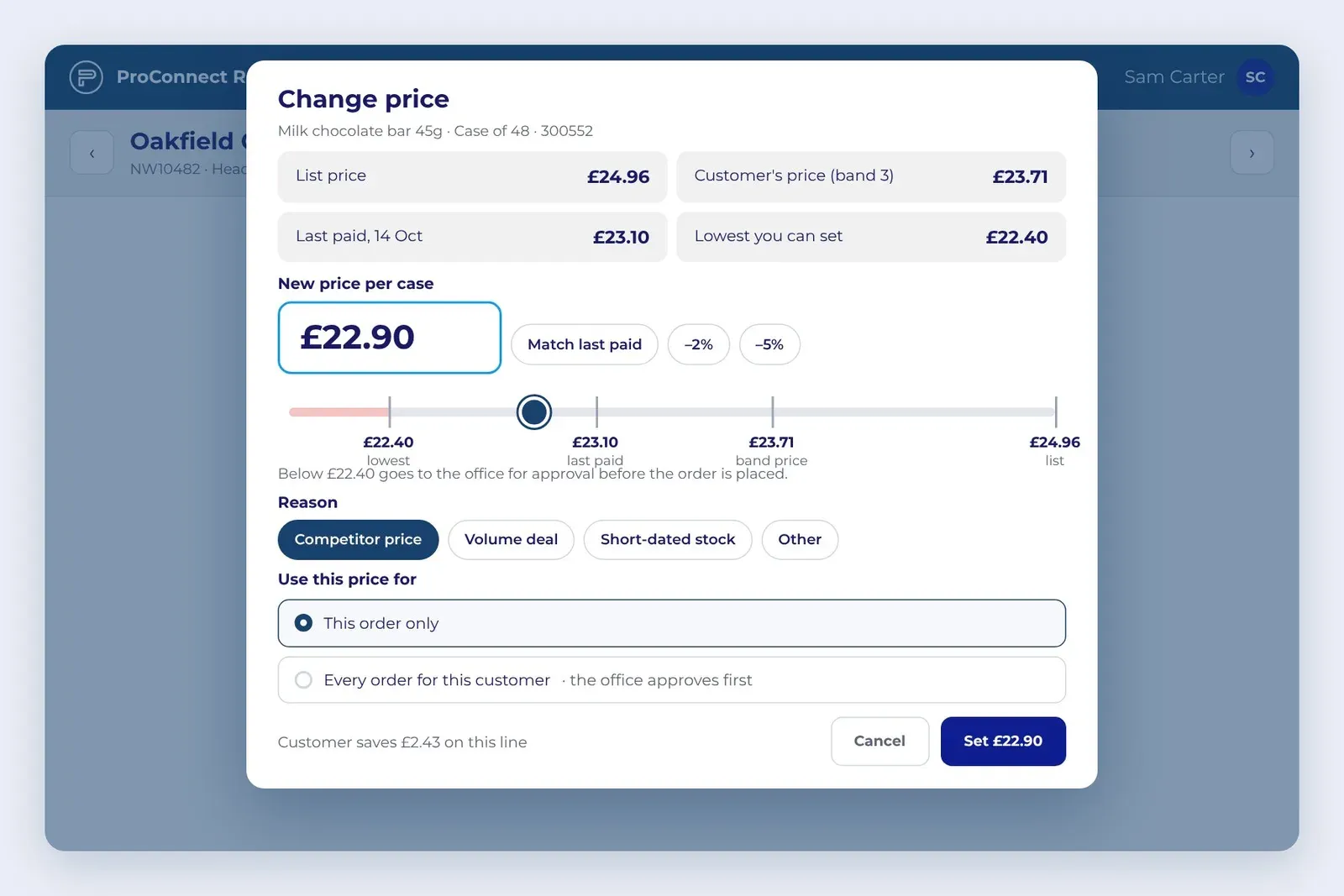
List price, the customer’s band price, what they last paid and the lowest price allowed, side by side. The office sets the floor; anything below it goes for approval before the order goes, with the reason kept on the order.
On account, nothing rekeyed
Orders go straight onto the customer’s account. No payment is taken by the rep, and every rep change is labelled on the order.












Ask the account, in the shop
The same AI that answers your customers on WhatsApp answers your reps. Standing in the aisle, the rep asks what the customer bought last Christmas, whether a credit note went through, or which lines on promotion they’ve never tried. The answer comes from the account, not from memory.
Where the question needs a person, it goes to your office the way a customer enquiry does.
How a visit runs
1Before the visit
The AI briefs the rep on the account: what has changed, what is overdue, what they usually buy but haven’t added.
2In the shop
The rep opens the customer’s live basket, adds the suggested lines and anything new, and the customer sees it on their app.
3Price changes
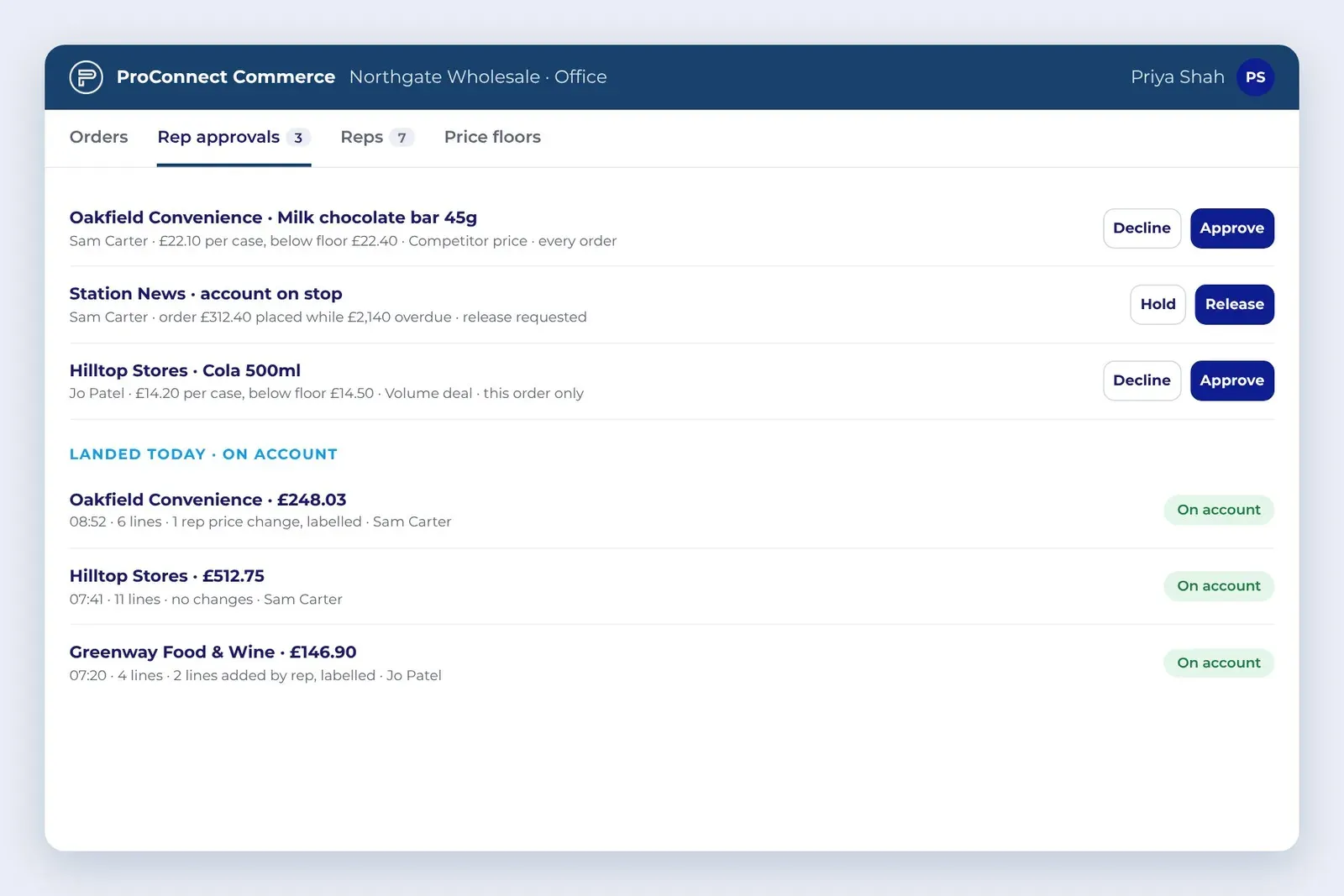
Reps change a price or discount on any line within limits you set, with a reason code and the margin in view. Anything beyond the limit goes to your sales manager to approve. The reason stays on the order.
4Back at the office
The order is already on the customer’s account. Nothing to rekey, every rep change labelled.
What the rep has on the visit
- Browse by category and brand, as well as search
- The customer’s usual lines first, with last order date and quantity, and one-tap reorder
- The customer’s own prices and promotions: was and now prices, deal terms, and a prompt when the basket is one case short of a deal
- Stock and availability, with a suggested substitute when a line is out of stock
- Account status at the top: credit limit, balance, overdue and on-stop
- Delivery day and cut-off, progress to the minimum order, PO reference, order notes and VAT in the basket
- Every order tagged to the rep and the channel, for commission, reporting and an audit trail
Customer approval, set the way you work
You choose how approval works for your business, and can set it customer by customer.
- Rep with the customer: the order is placed straight away and the customer gets a WhatsApp confirmation.
- Rep building the basket remotely: the basket goes to the customer on WhatsApp to approve, edit or reject before it expires.
- Price changes beyond the rep’s limit: these go to your sales manager, not the customer.
Licensed per rep seat
Rep is an add-on to ProConnect Commerce. One licence per wholesaler with five rep seats included; additional seats are added monthly. Orders go on the customer’s account, so there is no payment step for the rep and nothing new for finance to reconcile.
Works with the rest of ProConnect
- Web and app ordering: one basket and one customer record, whichever route the order takes
- WhatsApp: promotions that open straight into the basket, order updates in the chat
- Loyalty: points on purchases show in the account area (coming soon)
- Your ERP: pricing, stock, credit and orders flowing both ways
Buying groups and suppliers
A short supplier video can be shown to reps at login: a new line, a promotion or a range change. For buying groups, that is a route for supplier-funded content reaching every member’s reps on the same morning.
Launching November 2026
The first wholesaler goes live in November 2026. ProConnect Rep is available to ProConnect Commerce customers, including buying-group members.
Free downloadable B2B guides
Free guides for wholesalers, distributors and supplier brands exploring AI, WhatsApp and digital B2B growth.
 Introducing AI in Wholesale
(in assoc. with Mars Wrigley)
 WhatsApp in Wholesale guide
(in assoc. with Mars Wrigley)
 WhatsApp in B2B Insight Report
(available now)
 eB2B Playbook Quick Commerce guide
(in assoc. with Mars Wrigley)
 eB2B Perfect Content guide
(in assoc. with Mars Wrigley)
 Driving ROI with WhatsApp
(in assoc. with Mars Wrigley)
The latest news and updates from b2b.store
All newsAI ordering on WhatsApp: chat, voice and now photos
The ProConnect Service Agent now takes trade orders on WhatsApp from a photo of a handwritten note or a product on the shelf, as well as by chat and voice.
ProConnect Team
Spot the accounts that have gone quiet – and win them back on WhatsApp
Because ProConnect runs both your trade store and your WhatsApp channel, it can see who has stopped ordering and reach them in the same place.
ProConnect Team
GIFs now work in ProConnect WhatsApp campaigns
Moving images now play automatically at the top of your WhatsApp messages – and you can upload a GIF as it is.
ProConnect Team