ProConnect Team. 3 min read
How to bring WhatsApp into your business
Nine in ten people already use WhatsApp. Here is a simple way to implement it in your business: start with inbound customer service, then add marketing and utility.

How to bring WhatsApp into your business
WhatsAppAIProConnect Team · 7 October 2026 · 4 min read
Most businesses we speak to know they should be doing something with WhatsApp. Fewer know where to start. The good news is that you do not need a big project. You need one simple first step, and a sensible order for what comes after it.
This is the approach we recommend, and it is how we implement WhatsApp with our own customers.
Why
Why WhatsApp, and why now
Nine out of ten people already use WhatsApp. There is no app to download and nothing new to learn. Your customers have it open all day.
Increasingly, they use it for work as well. People message the businesses they buy from in the same way they message everyone else, and they expect a reply.
The free versions of WhatsApp were never built for that. They tie conversations to one phone and one person, and they do not connect to your other systems. The WhatsApp Business API addresses those limitations. It gives a business one managed channel that a whole team, and your software, can work through.

On top of that come two newer capabilities. Flows let a customer complete a form or a short journey inside the chat. AI lets the channel understand a question and answer it. Together they turn WhatsApp from a messaging app into a serious business tool.
Where to start
Three types of WhatsApp, and which to start with
Business WhatsApp comes in three types:
- Inbound customer service: customers message you, and you answer.
- Outbound marketing: you send promotions and content to customers.
- Outbound utility: you send one-to-one updates about a customer's own orders and account.
All three are worth having. Our advice is to start with inbound, because it is the easiest to set up and the quickest to prove.
How
Three steps, in this order
1
Start with inbound, using the ProConnect Service Agent
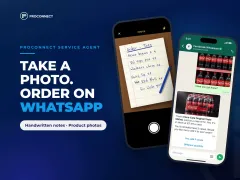
The starting point is simple. Put a "Talk to us on WhatsApp" button on your website, and upload information about your business. The ProConnect Service Agent handles the conversations from there. It can:
- answer customer questions from the information you have given it
- reply in the customer's own language, across 100 languages
- take messages, so nothing is missed
- triage issues and send tasks to the right department
You can be up and running in hours with a basic version. From there you build out the capability quickly, adding more information and more tasks as you see what customers actually ask.
2
Add marketing
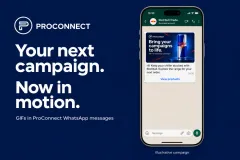
Once customers are talking to you on WhatsApp, the next step is to start talking to them. That begins with sending sales and marketing collateral to your customers. It soon goes further than promotions. The same channel works well for:
- surveying your customers
- event registration
- operational alerts
3
Add utility

The final step is utility: one-to-one messages that are specific to each customer. This is where WhatsApp starts to carry the day-to-day running of the account:
- order updates
- delivery status
- paying invoices
- credit control
Start small, then build
You do not have to do all of this at once, and you should not try to.
Start with inbound. Get the Service Agent live, see what your customers ask, and build from there. Marketing and utility follow naturally once the channel is working.
See the ProConnect Service Agent